HiDoctor(R) CID-10 - Classificaç
Publisher Description


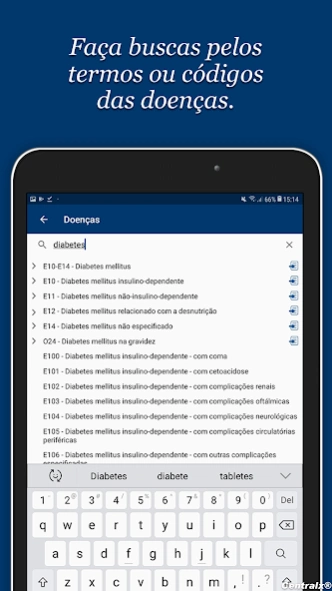
Complete ICD-10 in the palm of your hand for offline diseases and codes.
With the HiDoctor® CID app you have the 10th version of the full International Classification of Diseases on your phone or tablet for quick and convenient consultation whenever you need it.
In the routine of medical practice, the diagnoses made must be correctly informed according to ICD-10, assigning the appropriate code referring to the diagnosed condition. You do not have to memorize all the correct disease terms and the codes of each, as it is much simpler to have the classification always available with you to quickly consult when you need it and to ensure the accuracy of the information.
Full content is available offline and you can browse through chapters, groups and categories. You can also search by name or description of the disease you wish to consult or by code, all without relying on an internet connection.
ICD is essential for all doctors, so enjoy the convenience of always having it at your fingertips by installing the app on your Android.
About HiDoctor(R) CID-10 - Classificaç
The company that develops HiDoctor(R) CID-10 - Classificaç is Centralx. The latest version released by its developer is 1.0 .
To install HiDoctor(R) CID-10 - Classificaç on your Android device, just click the green Continue To App button above to start the installation process. The app is listed on our website since 2019-12-02 and was downloaded 0 times. We have already checked if the download link is safe, however for your own protection we recommend that you scan the downloaded app with your antivirus. Your antivirus may detect the HiDoctor(R) CID-10 - Classificaç as malware as malware if the download link to com.centralx.cid2 is broken.
How to install HiDoctor(R) CID-10 - Classificaç on your Android device:
- Click on the Continue To App button on our website. This will redirect you to Google Play.
- Once the HiDoctor(R) CID-10 - Classificaç is shown in the Google Play listing of your Android device, you can start its download and installation. Tap on the Install button located below the search bar and to the right of the app icon.
- A pop-up window with the permissions required by HiDoctor(R) CID-10 - Classificaç will be shown. Click on Accept to continue the process.
- HiDoctor(R) CID-10 - Classificaç will be downloaded onto your device, displaying a progress. Once the download completes, the installation will start and you'll get a notification after the installation is finished.
Program Details
System requirements
Download information
Pricing
Version History
version 1.0
posted on 2019-12-02
Primeira versão da CID-10 completa na palma da mão para consultar doenças e códigos offline.
